

Procedural Modelling Tools - Vine Tool
- Jul 25, 2018
- 4 min read
This summer I was in an internship with NetEase and I helped them created a bunch of modelling tools referencing models from awesome MMORPG 逆水寒 (Justice Online: https://www.youtube.com/watch?v=pezCdF6mvf8 ). The intern turned out to be quite a good experience. Here is the introduction to the tools that I created.
Tool: Houdini and Houdini Engine
Language: Vex and Python
Overview
The tool takes in arbitary Nurb Curve as main input leaf models as optional inputs. Then it manipulates the curve as the base for randomly distributing points. Based on those points, vines are generated with proper UV and leaves can be added upon vines if needed.
Technical Details
1. Forming Vine curves

Nothing fancy in this part, the tool takes in the input curve and calculate its length along its U coordinate so you get the absolute length of the curve. A trick here is to use a Vex function called primarclen (http://www.sidefx.com/docs/houdini/vex/functions/primarclen.html). And after that I just did a resample and randomly pick points for the root of vines.

The next part is a bit tricky. Nurbe Curve is a good representation for nature bending shapes. The way to construct it somehow different. I first calculated the Bitangent of the point and use them as the direction to "grow the root" of vines. With the root established, I find the middle of the root and created a middle point under them. With two more points enforcing the shape of root, a nice looking Vine curve can be craeted. Of course I exposed some parameters to allow artists tweak on it later. Another hard part is the reordering of points for Curve formation. I hard coded it so the curve always have a nice point number order from 0 to 6.

2. Manipulate Vine curves and create Vine shape
Now we have a nice shape of the curve and while I'm happy with it, my environment artist came by and said something went wrong. Usually he want to spare more geos on the curve part of the vine as for most of the time, roots are covered by folliage or inserted into the ground. So I need to find a way to push more points towrad the center. Here is the result

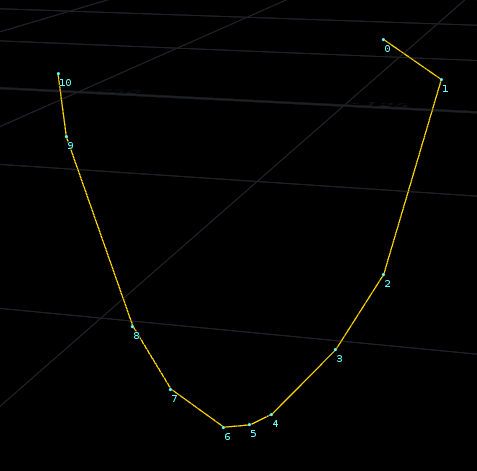
On the left side is the original curve and on the right side is the curve after 10 iteration of the algorithem. You can see now points are moved toward its center. The trick is to calculate the direction of each points toward its corresponging points with lower height. And also calculate the distance between each points and the center point. With these two parameters calculated, I just did a for loop which moves each point toward its center with a weight of its distance. Artists can decide how long they want points to move and how many times the for loop calculates.


Take a look at the result after sweep. More points are centered toward the lower part of the geo. The sweep itself is fairly straight forward. You start with the shape you want and use an attribute create node to assign a custom UV attribute on each point of your primitive geometry, then after the sweep, use an attribute wrangler node to tell Houdini to transfer custom UV to actual UV, which yield evenly distributed UV stacking on top of each other.
There is another trick I want to share. One feature of my tool is to allow artists to control the width along the vine curve. I provided a graph to let them drag through. To achieve this, one can either do it with VOP or code it with Vex, which is the way I picked.

So in the "Edit Parameter Interface" window of the attribwrangle node, you need to add one Ramp parameter which is the Houdini built in support for graph. Give it proper name (i.e WidthRamp). Then you need to calculate the proportion of each point along the curve and use that proportion to fetch the ramp value using chramp. Sweep node utilized the existing attribut pscale to control the width. So I multiplied the ramp value I fetched from the ramp with pscale to get the final result.
3. Leaf
Artists can choose to throw leaf models into the tool to decorate the vines. The same vine curves I generated previously are used. But I noticed that those leaves look kind of boring if I just resample the curve and duplicate along points. So I did a point jitter on the resampled curve to make the leaf look more organic.


Another very interesting thing is the trace node in Houdini. The node takes in a image file, find out its silhouette and create geometry from it. And with the new PolyReduce node in Houdini 16.0, you can easily get a low resolution of it and use it for games.


Review
The downside of this tool is obvious - too many controls. No artists like to ready 10 pages of documentations and facing 20 sliders in one panel (even if those sliders are necessary for all those details). The future solution might be provide more simple controls like(i.e. think and thin instead of leaf distances).
Comments